Open Source & Self-Hosted

Your AI team,
running locally.

Multi-model AI agents with tool execution, email, voice, and workflow automation. One command to install. Your data stays yours.

$ curl -fsSL https://kukui.bot/install.sh | sh
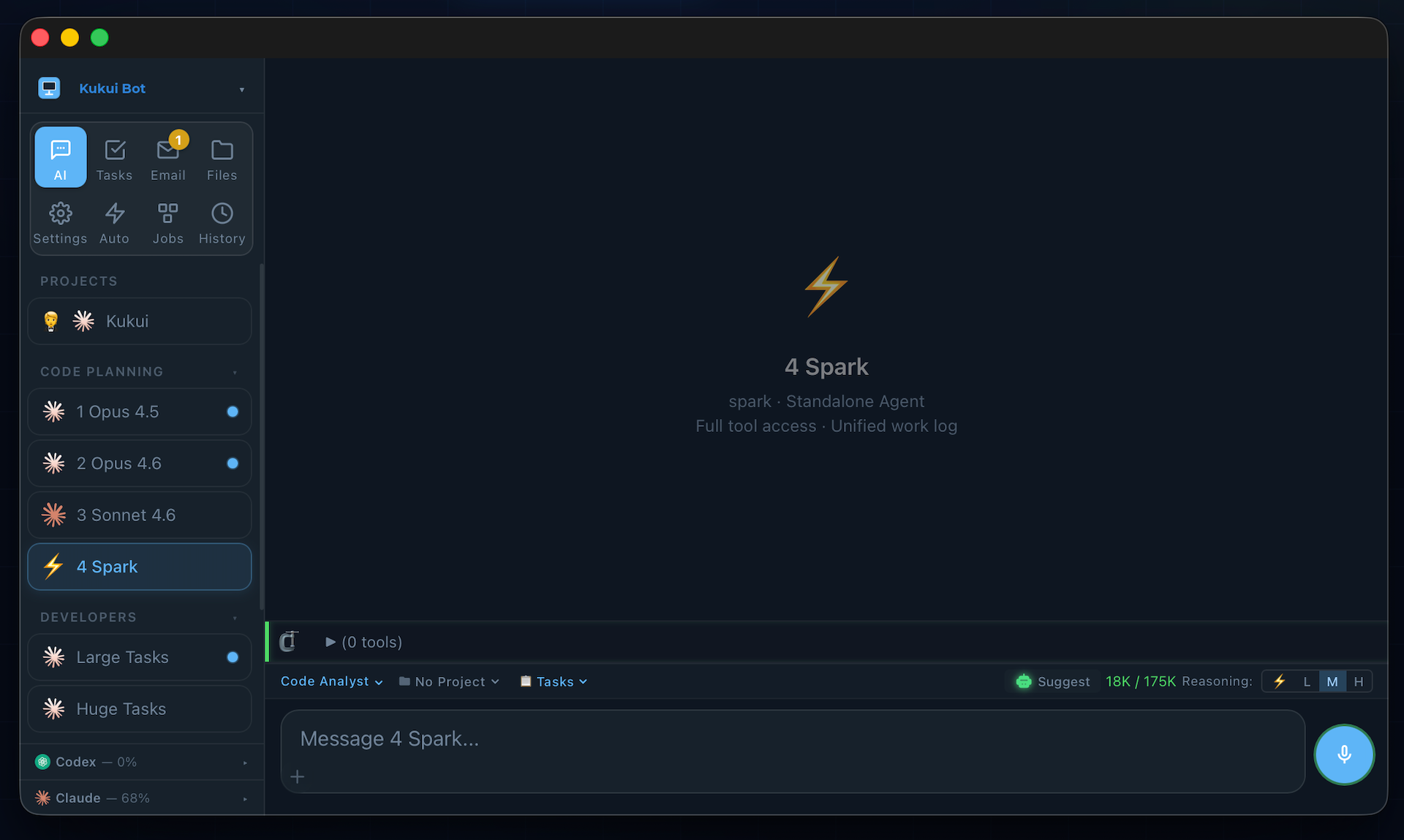
Kukui Bot — Multi-model AI agent platform with sidebar workers, chat, email, and task management
You
Scan the network and find all devices on my LAN
Kukui · Opus 4.6
Found 23 devices on 192.168.1.0/24. Here's the summary:
$ nmap -sn 192.168.1.0/24
✓ 23 hosts up · 4 IoT · 3 Apple TV · 2 servers
Kukui · Opus 4.6
I've dispatched the security analyst to check for open ports and vulnerabilities. You'll get a notification when the report is ready.
Works with every major AI provider
Claude
Claude
OpenRouter
OpenRouter
xAI
xAI Grok
Gemini
Google Gemini
Codex
OpenAI Codex

Research at scale.
Protected by default.

Query multiple search providers simultaneously, fetch and analyze web content, and guard every result against prompt injection — before it reaches your AI.

Research QueryNatural language question SEARCH PROVIDERS — PARALLEL GoogleWeb Search DuckDuckGoWeb Search PerplexityAI Search xAIGrok Search Ranked Result MergeDeduplicate & score by relevance 🛡 Injection GuardScan for prompt injection ✓ Verified Clean ResultsSafe to pass to AI context AI Synthesized Answer

Every web result passes through injection scanning before reaching your AI — protecting against adversarial websites trying to hijack your agent.

From one-liners to
massive projects.

Dispatch work across an entire team of AI specialists. The Dev Manager plans, analysts research, developers build, and QA validates — all automatically.

Project Manager Opus 4.6 DISPATCH ANALYST TEAM — PARALLEL Opus 4.6 Code Analyst Opus 4.5 Code Analyst Sonnet 4.5 Code Analyst Codex Code Analyst Synthesize & Plan Split into 4 phases BUILD TEAM — PARALLEL Phase 1 · Opus Developer Phase 2 · Opus Developer Phase 3 · Opus Developer Phase 4 · Opus Developer QA VERIFICATION PIPELINE Chat UX Harness Streaming & render tests Integrity Suite 7 server-side scenarios Verification Gate Pass → Ship  ·  Fail → Iterate Advanced Workflows by StepWise stepwise.run ↗ Final QA Review Project Manager · Opus 4.6 BROWSER VERIFICATION Visual Regression Playwright screenshot diff Functional Test Click, navigate, verify ✓ Shipped

Every project — big or small — flows through planning, parallel analysis, phased execution, and automated verification. Failures loop back until quality gates pass.

Everything you need.
Nothing you don't own.

A complete AI workspace on your hardware. Chat, code, email, automate — all behind your own HTTPS certificate.

💬

Multi-Model Chat

Run Claude, Grok, Gemini, and 100+ OpenRouter models side-by-side. SSE streaming, markdown, and 1M token context.

🛠

Tool Execution

Bash, file I/O, browser automation, web search, image & video generation. Agents that do things, not just talk about them.

📧

Email Integration

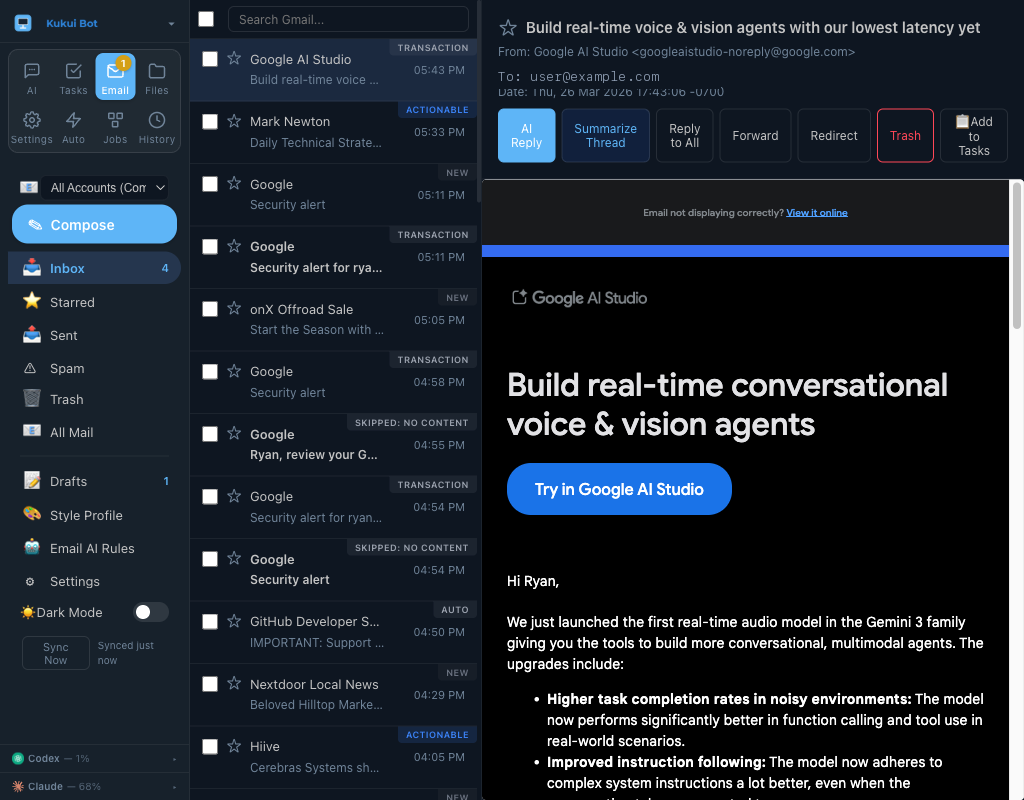
Full Gmail inbox with AI drafting, thread intelligence, classification rules, and XSS-sanitized compose. Cache-first for instant rendering.

🎤

Voice Pipeline

Local STT via Qwen3-ASR on Apple Silicon. Wake word detection, speaker verification, and TTS — zero cloud dependency.

⚙️

Workflow Engine

YAML-driven DAG execution with retry logic, human approval gates, and crash-proof state persistence via SQLite.

🖥️

Browser Automation

Playwright-powered browser control. Navigate, click, type, extract, screenshot — your agents can browse the web.

👥

Multi-Worker Delegation

Dispatch tasks across multiple AI workers in parallel. Cross-model analysis with automatic completion notifications.

📅

Calendar & Tasks

Google Calendar and Tasks with full UI integration. OAuth sign-in, event management, and AI scheduling.

🔒

Security First

Fernet-encrypted keys, bcrypt passwords, injection guards, workspace sandboxing, and elevation prompts for dangerous ops.

50k+
Lines of Code
30+
Built-in Tools
5+
AI Providers
1
Command to Install

Unified inbox.
AI superpowers built in.

Connect multiple Gmail accounts into one view. AI classifies, drafts, and triages every email automatically.

Install & Run
# Install (macOS or Windows)
$ curl -fsSL https://kukui.bot/install.sh | sh

# Open your browser
$ open https://localhost:8080

# Setup wizard walks you through:
#   1. Create your password
#   2. Add AI provider keys
#   3. Start chatting
What You Get
 HTTPS server with auto-trusted certs
 Multi-model AI chat with streaming
 Full tool execution sandbox
 Gmail integration with AI drafting
 Voice input & text-to-speech
 Browser automation (Playwright)
 Workflow engine with DAG execution
 Task management & calendar
 Mobile-responsive UI
 Cross-device tab sync

Built for people who
actually use AI.

👨‍💻
Software Development
Code writing, review & project management
Dispatch parallel code analysts across Opus and Codex, synthesize findings, then hand off to a developer worker. Multi-file refactors that took hours now take minutes.
📨
Email Triage
AI classification, drafting & thread intelligence
AI rules classify incoming mail, auto-draft replies in your writing style, detect phishing, and summarize long threads. Inbox zero becomes achievable.
🏠
Home Automation
Voice control with local LLM reasoning
Wake word activates local STT, the LLM reasons about your command, and tool calls control lights, shades, and climate. Everything on Apple Silicon — no cloud, no latency.
🔍
Research & Analysis
Multi-model parallel research
Send the same question to multiple models simultaneously, cross-reference answers, and generate comprehensive reports with built-in multi-provider web search.

How it's different.

vs. ChatGPT / Claude.ai

Self-hosted, not rented

Your conversations stay on your machine. No subscription. No caps. Run any model from any provider through one interface.

vs. Open WebUI / LibreChat

Agents, not just chat

Not a chat wrapper. Tool execution, browser automation, email, workflow DAGs, multi-worker delegation, and a voice pipeline.

vs. LangChain / CrewAI

Product, not framework

No boilerplate. No configs for every interaction. A complete UI with everything wired together. Install and use it.

Ready to run your
own AI team?

One command. Five minutes. Full control.